
Principles of a Well-Architected AWS Infrastructure
When building systems on Amazon Web Services, DevOps teams must align designs to the AWS Well-Architected Framework. This framework is built on six pillars: Operational Excellence, Security, Reliability, Performance Efficiency, Cost Optimization, and Sustainability.
Visualizing a Highly Available Multi-AZ Architecture
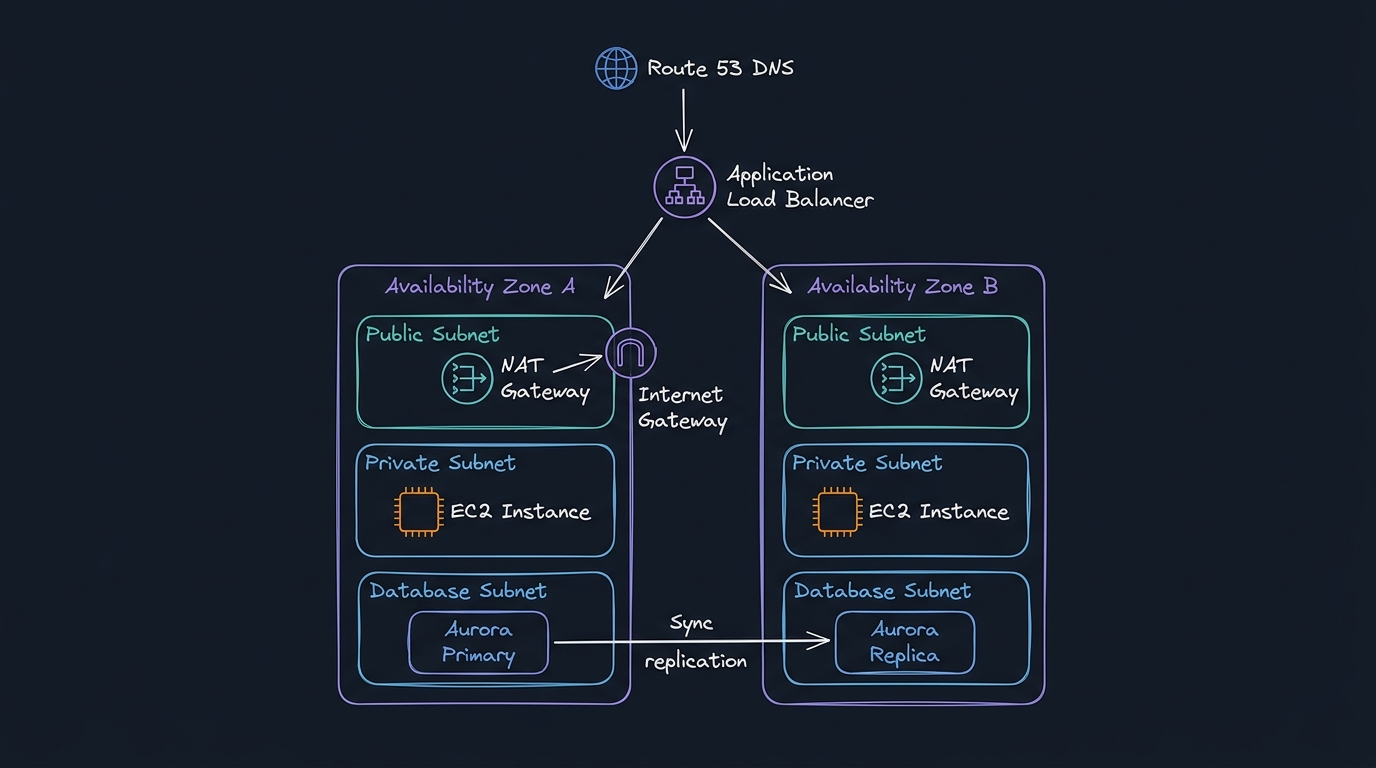
1. Amazon Route 53: Provides DNS routing, failover configurations, and health checks.
2. Application Load Balancer (ALB): Distributes incoming application traffic across target EC2 instances or ECS tasks in multiple Availability Zones.
3. NAT Gateway: Placed in public subnets to allow EC2 instances in private subnets outbound access to the internet for system updates, while rejecting unsolicited inbound connections.
4. Amazon Aurora: Offers MySQL/PostgreSQL-compatible relational databases with storage replicated across three Availability Zones.
---
Technical Q&As (AWS System Design)
Q1: What is the difference between a NAT Gateway and a VPC Endpoint? When would you use a VPC Gateway Endpoint instead of an Interface Endpoint?
Answer: Both components handle network routing, but they serve opposite directions:
- NAT Gateway: Translates private IP addresses to public IPs, permitting private EC2 instances outbound access to the public internet. Traffic travels over the public internet gateway.
- VPC Endpoint: A private connection powered by AWS PrivateLink. It allows resources in your VPC to communicate with AWS services (like S3, DynamoDB, or KMS) using private IP addresses. Traffic never leaves the Amazon network backbone.
AWS offers two types of VPC Endpoints:
1. Gateway Endpoints: Available only for Amazon S3 and DynamoDB. They are free of charge and operate by writing a route entry in your VPC route tables pointing to the service prefix list.
2. Interface Endpoints: Available for almost all other AWS services (EC2, Secrets Manager, etc.). They cost an hourly fee and charge for data processed. They place an ENI (Elastic Network Interface) with a private IP inside your subnet and register local DNS entries.
Q2: How do you protect against "Access Denied" errors when EC2 instances upload logs to an S3 bucket? Trace the role of IAM Instance Profiles.
Answer: Hardcoding AWS credentials (Access Key and Secret Key) inside configuration files or scripts is a severe security risk. To authorize EC2 instances, we use IAM Instance Profiles:
1. IAM Role: Create an IAM Role with a trust policy that allows the ec2.amazonaws.com service to assume the role.
2. Permissions Policy: Attach a policy to the role granting S3 permissions (e.g., s3:PutObject).
3. Instance Profile: Associate the IAM Role with the EC2 instance using an Instance Profile wrapper.
4. Credential Retrieval: Inside the instance, the AWS SDK automatically queries the IMDSv2 (Instance Metadata Service) to retrieve short-lived session credentials:
bash
# Querying IMDSv2 token first
TOKEN=$(curl -s -X PUT "http://169.254.169.254/latest/api/token" -H "X-aws-ec2-metadata-token-ttl-seconds: 21600")
# Retrieving temp credentials
curl -s -H "X-aws-ec2-metadata-token: $TOKEN" http://169.254.169.254/latest/meta-data/iam/security-credentials/
This secures credentials by generating new temporary tokens every few hours automatically.
Q3: What are the differences between Security Groups and Network Access Control Lists (NACLs)?
Answer: The differences represent two layers of firewall protection inside a VPC:
| Attribute | Security Group | Network Access Control List (NACL) |
|---|---|---|
| Operating Layer | Operates at the Instance level (virtual interface). | Operates at the Subnet boundary level. |
| Statefulness | Stateful: Outbound response traffic is automatically allowed regardless of outbound rules. | Stateless: Response packets must be explicitly allowed by rules in both directions. |
| Rules Type | Supports "Allow" rules only. | Supports both "Allow" and "Deny" rules. |
| Execution Order | All rules are evaluated simultaneously. | Rules are processed sequentially in number order (lowest to highest). |
---
AWS CLI Troubleshooting Snippets
Verifying VPC Route Table Configuration
To check if a subnet is properly routed to the internet gateway (IGW):
aws ec2 describe-route-tables --filters "Name=vpc-id,Values=vpc-0123456789abcdef0" --query "RouteTables[*].Routes"Look for a route with DestinationCidrBlock: 0.0.0.0/0 and an GatewayId starting with igw-.
Creating a Gateway VPC Endpoint for S3
To set up private S3 connections for a VPC without NAT fees:
aws ec2 create-vpc-endpoint --vpc-id vpc-0123456789abcdef0 --service-name com.amazonaws.us-east-1.s3 --route-table-ids rtb-0987654321fedcba0