
The Terraform Core Execution Cycle & State Management
Terraform is a declarative, stateful Infrastructure as Code utility developed by HashiCorp. It reads your configuration files (.tf) and builds a dependency graph of resources to orchestrate state updates on cloud providers.
State File & Lifecycle Operations
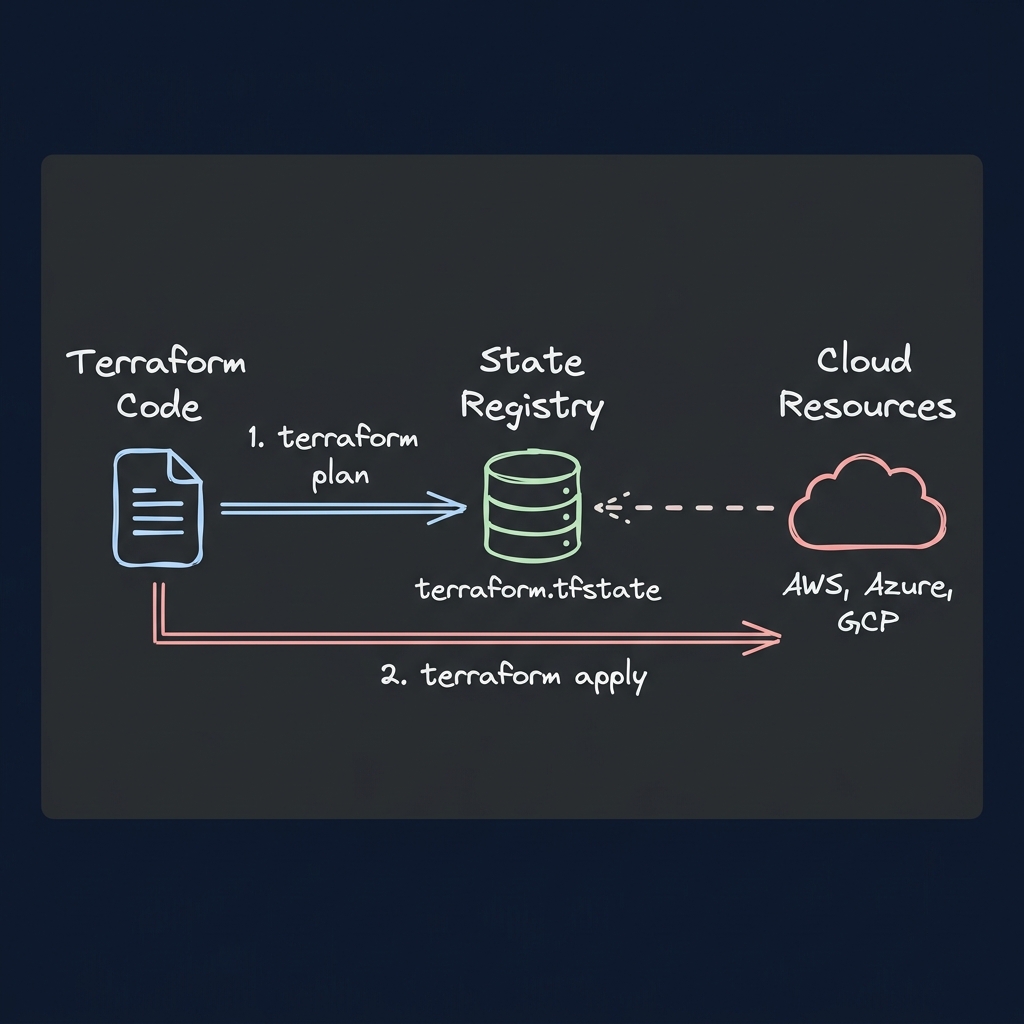
1. terraform init: Initializes the workspace, downloads target provider plugins (e.g. AWS, Azure), and configures backend connections.
2. terraform plan: Performs a dry-run comparison. It queries the target cloud provider, reads active states, compares them to your code, and outputs a plan of additions (+), modifications (~), and destructions (-).
3. terraform apply: Executes the plan. It updates resources on the provider and records the final state map inside terraform.tfstate.
---
Technical Q&As (IaC Operations)
Q1: What is Terraform State Locking, why is it critical, and how do you recover from a stranded state lock in a team CI/CD pipeline?
Answer: When multiple engineers or build machines attempt to run Terraform pipelines concurrently, they risk overwriting each other's changes or corrupting the state file. To prevent this, Terraform implements State Locking:
- Backend Support: Standard backends like Amazon S3 use an auxiliary database table (like DynamoDB) to write a lock record containing the execution ID. While active, any other pipeline execution will fail with an error.
- Force Unlock: If a CI/CD build crashes during an apply phase, the lock record might remain stranded. To clear this lock, inspect the lock ID from the terminal error logs and run:
terraform force-unlock *Caution: Only force unlock if you are 100% sure that no other apply process is currently running on the resources.*
Q2: How do you handle configuration loops using 'count' vs. 'for_each'? When should you choose one over the other?
Answer: Both operators create multiple instances of a resource, but their underlying key tracking mechanisms differ:
1. count: Takes a list or number and generates resources indexed by array positions (e.g. aws_instance.web[0], aws_instance.web[1]).
- *Problem*: If you remove an element from the middle of the input list, Terraform shifts all subsequent resource keys. During the next apply, it will attempt to destroy and recreate resources that shouldn't be touched.
2. for_each: Takes a map or set of strings and creates resources indexed by string keys (e.g. aws_subnet.private["subnet-a"], aws_subnet.private["subnet-b"]).
- *Advantage*: Removing or adding items to the input map only affects the specific target key. The rest of the keys remain unchanged, preventing accidental resources deletions.
Q3: How do you securely handle sensitive values (like passwords or API tokens) in Terraform without hardcoding them in git repositories?
Answer: Best practices for handling secrets in IaC include:
- Declare as Sensitive: Mark variables as sensitive to prevent Terraform from printing their values in stdout during plan and apply:
variable "db_password" {
  type      = string
  sensitive = true
}- Environment Variables: Populate the variable from your shell or CI/CD environment using the
TF_VAR_prefix (e.g., exportTF_VAR_db_password="secret123"). - External Secrets Managers: Use Terraform data sources to fetch secrets at runtime from systems like AWS Secrets Manager or HashiCorp Vault:
data "aws_secretsmanager_secret_version" "db_creds" {
  secret_id = "production/database/credentials"
}
# Reference using: jsondecode(data.aws_secretsmanager_secret_version.db_creds.secret_string)["password"]
---
Core Terraform Syntax & Troubleshooting
Implementing Dynamic Ingress Blocks
Use the dynamic block configuration to generate security group rule parameters programmatically, keeping your code DRY:
variable "ingress_ports" {
  type        = list(number)
  default     = [80, 443, 8080, 9000]
  description = "Allowed incoming TCP ports"
}

resource "aws_security_group" "web_firewall" {
  name        = "web-traffic-rules"
  description = "Orchestrated ingress configurations"
  vpc_id      = "vpc-01234567"

  dynamic "ingress" {
    for_each = var.ingress_ports
    content {
      from_port   = ingress.value
      to_port     = ingress.value
      protocol    = "tcp"
      cidr_blocks = ["0.0.0.0/0"]
    }
  }
}
Identifying State Drifts via CLI
If someone manually edits a resource in the AWS Console, Terraform's local state file becomes out of sync (State Drift). To check for drifts without modifying configurations:
terraform plan -detailed-exitcodeTo synchronize the local state map with actual cloud reality, run:
terraform refresh